
Orux AI / Model notes
Kling v3 API: Audit Frames Before a 24 fps Edit
Inspect an existing Kling v3 macro clip: 121 decoded frames, a 120-frame edit slot and a reproducible Python ingest report. Separate timing, motion review and cost.
On this page
Inspect decoded frames before locking a five-second edit
A five-second request is not enough information to place a Kling v3 clip into an exact 120-frame, 24 fps timeline slot. Inspect the delivered file. In the existing Orux harmonica-reed example analyzed here, the requested duration is five seconds, but the saved MP4 contains 121 decoded video frames at 24 fps, with a reported duration of 5.041667 seconds. That is an editing boundary to resolve, not evidence by itself of a failed generation or an incorrect bill.
For an editor assembling a mechanical-detail insert, the useful deliverable is a frame-indexed ingest report. The Python example below produces a complete timestamp CSV and a proposed edit plan: keep zero-based frames 0–119 for the five-second slot, and review frame 120 separately. It does not modify or export the video. The source remains available below so that you can judge the visible action as well as its timing.
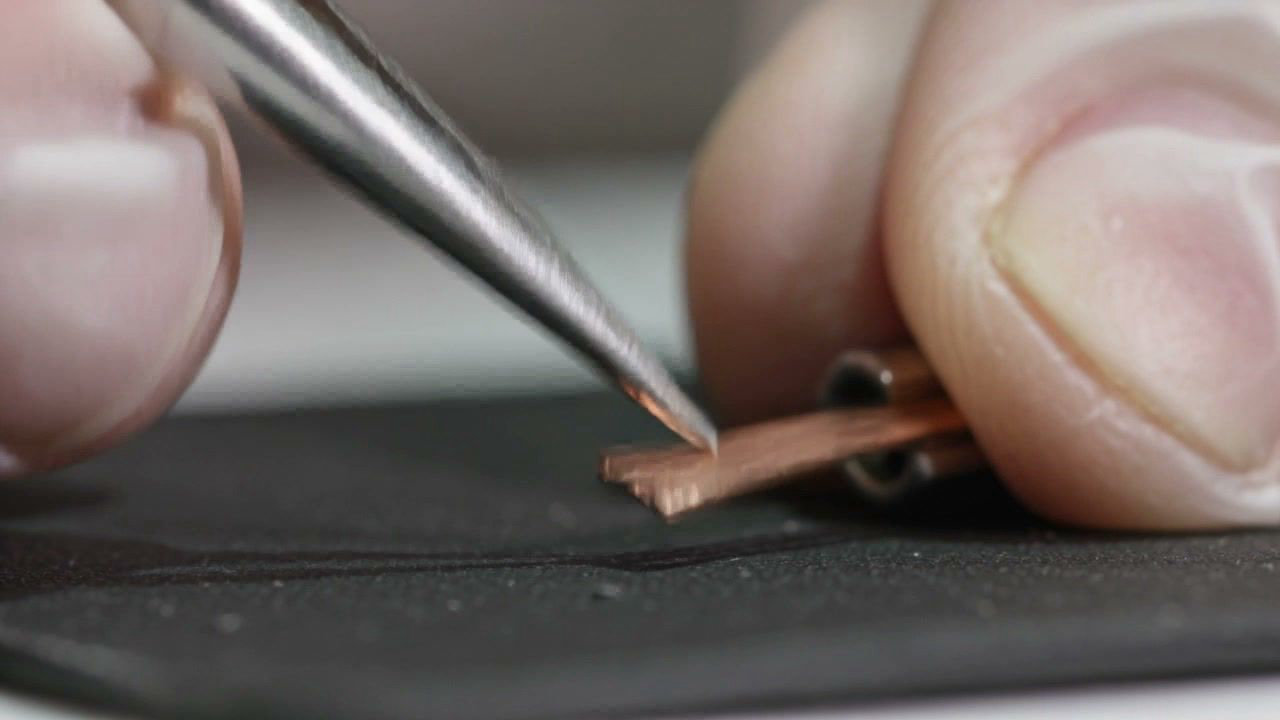
Actual source frame 72, presentation time 3.000000 seconds. It is extracted from the existing model example, not a newly generated image.
The actual Kling v3 case and its saved settings
The source comes from the Orux Kling v3 model page. The saved case depicts tweezers interacting with a copper harmonica reed in an extreme close-up. Its original prompt is preserved here:
维修者用细镊子轻拨一片铜簧片,簧片短暂振动后静止,超近距单镜头。
English translation for readers: “A repairer gently plucks a copper reed with fine tweezers; the reed briefly vibrates and then becomes still, in one extreme close-up shot.” This translation explains the saved input; it was not a different prompt used for a new generation.
The stored settings are duration: 5, aspect_ratio: "16:9", mode: "std", sound: "off" and kling_v3_type: "t2v". No reference-image input is recorded for this case. Do not describe it as a demonstrated image-to-video preservation test. No new model request was made for this article.
Original saved Kling v3 case, requested as five seconds in std mode with sound off. The file audited here is 121 frames at 24 fps; it is not a new generation for this article.
The current public form, checked November 3, 2026, offers durations from 3 to 15 seconds, the 16:9, 9:16 and 1:1 aspect ratios, std/pro modes and sound on/off. Those options describe the checked Orux integration. This analysis does not infer additional native-model controls or claim that selecting another mode would repair any visible motion.
What six sampled frames show—and what they cannot prove
The source is 1,280 × 720, and the inspected file contains no audio stream, consistent with its saved sound-off setting. At the sampled moments, the camera framing remains a close-up of fingers, tweezers and the reed. Near three seconds, the reed's visible shape changes around the contact point; in later sampled frames, the tool is withdrawn relative to that contact position.
These observations are useful when deciding where the action belongs in an edit. They do not measure a real reed's vibration frequency, prove mechanical accuracy or establish that every intermediate frame is artifact-free. A still sampled once per second cannot establish a rapid vibration cycle. Watch the original clip and inspect the relevant intermediate frames before using it as more than an illustrative insert.
| Zero-based source frame | Presentation time | Editorial observation at that sample |
|---|---|---|
| 0 | 0.000000 s | Establishes the close-up, fingers and tool near the reed |
| 24 | 1.000000 s | Tool remains near the reed; the working area is still visible |
| 48 | 2.000000 s | Another contact-area reference before the larger visible pose change |
| 72 | 3.000000 s | Reed appears broader or lifted around the contact area |
| 96 | 4.000000 s | Tool is withdrawn relative to the three-second contact position |
| 120 | 5.000000 s | Final sampled frame starts at the five-second boundary |
Swipe horizontally to view the full table.
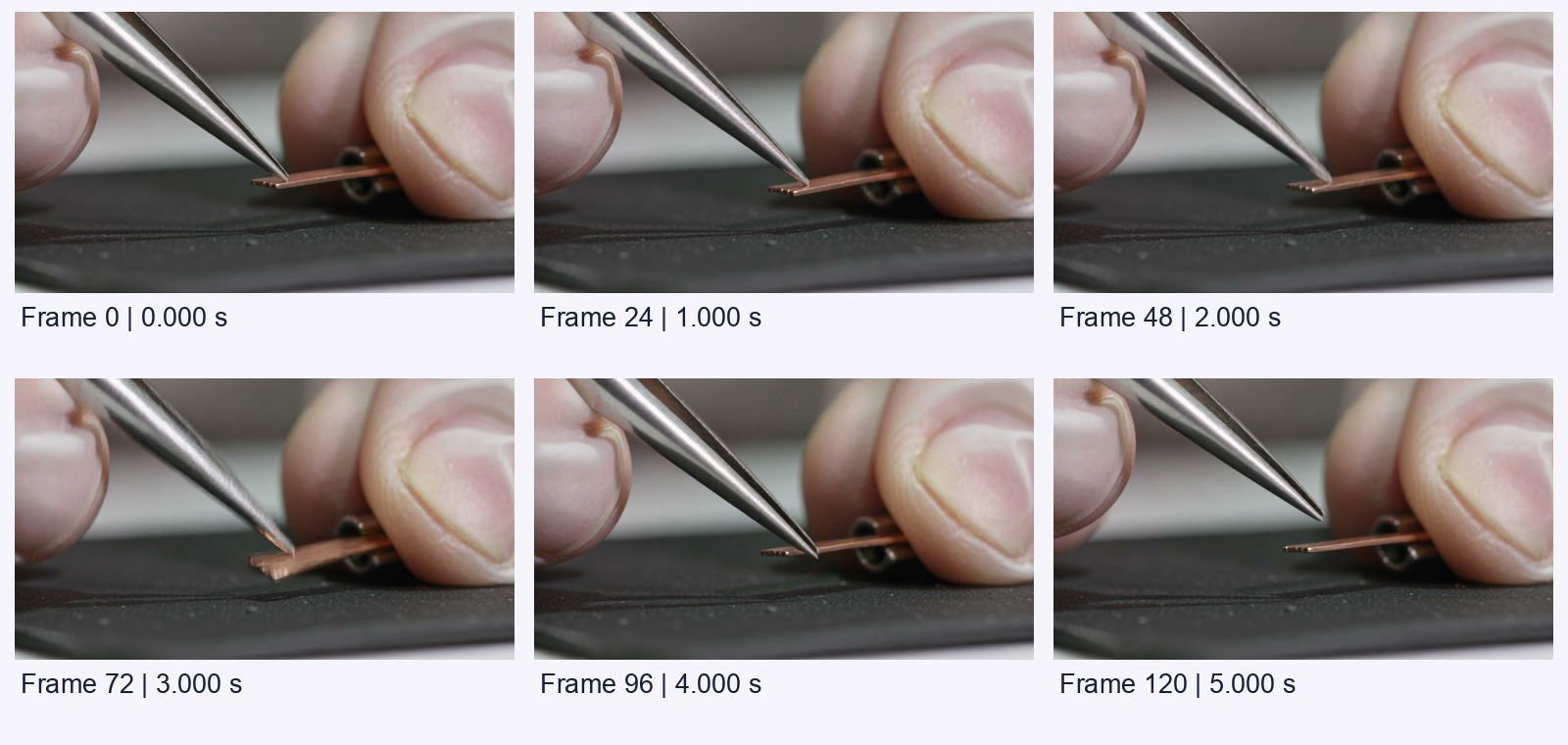
Source frames 0, 24, 48, 72, 96 and 120 at their recorded presentation times. Frames are shown with their full composition; labels and the contact-sheet layout were added locally.
For a different kind of visual decision, the Kling 4.0 same-prompt shot comparison discusses choosing between existing takes. Here, there is only one saved take; the question is how its actual frame timing fits an edit. Neither article turns a few observations into a model-wide reliability score.
Distinguish the last frame's timestamp from the clip's duration
At exactly 24 fps, one frame interval is 1/24 second, approximately 0.041667 seconds. A five-second slot contains 120 frame intervals. With zero-based indexing and a source that starts at time zero, its frame starts are 0, 1/24, 2/24 and so on through 119/24, or 4.958333 seconds.
The next frame, index 120, starts at 5.000000 seconds. Including that frame for another interval gives 121/24, or approximately 5.041667 seconds. That explains why the file's last presentation timestamp and its reported duration can differ without contradicting one another. A timeline slot conventionally expressed as the half-open interval [0, 5) excludes a frame whose start is exactly five seconds.
The audit checks actual presentation timestamps rather than multiplying an average-rate label and trusting the result. It verifies that each decoded timestamp follows the assumed 24 fps grid within two microseconds, allowing for the six-decimal timestamp representation returned in this run. The tolerance is a parsing check for this sample, not a perceptual quality threshold.
Do not reuse the same arithmetic blindly for variable-frame-rate files or a 23.976 fps project. Those need a different timing policy. The code deliberately rejects a different average rate and a timestamp sequence that fails its constant-rate assumption. Its output is a narrowly defined ingest plan, not an automatic frame-rate conversion tool.
Budget the requested settings separately from the file audit
The current Orux rates below were checked on November 3, 2026. The configured conversion is 1 Credit = USD 0.005. Values are per generated second for the listed mode and sound setting. The five-second column is arithmetic planning for a new request, not the historical charge for this saved example.
| Kling v3 settings | Current Orux rate / second | Planned five-second request |
|---|---|---|
std, sound off — saved case setting | 16.00008 Credits (USD 0.0800004) | 80.0004 Credits (USD 0.400002) |
pro, sound off | 21.33336 Credits (USD 0.1066668) | 106.6668 Credits (USD 0.533334) |
std, sound on | 24.00024 Credits (USD 0.1200012) | 120.0012 Credits (USD 0.600006) |
pro, sound on | 32.00016 Credits (USD 0.1600008) | 160.0008 Credits (USD 0.800004) |
Swipe horizontally to view the full table.
This article incurred no new generation charge. Inspecting an existing local file, writing a CSV and deciding which frames to keep do not require another model invocation. Editing away a frame also does not establish a refund or change the generation's historical charge. No billing receipt for the original case was used here, so its 5.041667-second file metadata must not be presented as proof of how many seconds were billed.
When a new creative direction is necessary, confirm the current settings and account quote before requesting another take. When the only problem is fitting an otherwise usable result into an exact slot, resolve the timeline decision first. Consult the Orux API documentation for integration details; this workflow concerns the delivered file rather than API polling or retry machinery.
Run the frame audit and retain the source
Install FFmpeg so that ffprobe is available on your command line, and use Python 3.9 or later. The official ffprobe documentation explains stream inspection, decoded-frame counting and per-frame information. The program uses only Python's standard library in addition to the local ffprobe executable.
Save the existing video from the embedded player or model page as source.mp4, then save the following as audit_clip.py. Run python3 audit_clip.py source.mp4 from a writable directory. Use the website's normal video access flow; a raw downloader without the site's expected request context may receive a CDN access refusal. The program itself does not download media, contact a model endpoint or use an API key.
import csv
import hashlib
import json
import subprocess
import sys
from decimal import Decimal
from fractions import Fraction
from pathlib import Path

EXPECTED_SHA = '5c948c89baf54c46c85afe65c33636bebb8a6a79acc22eebcce2412aef3e5515'
SOURCE = Path(sys.argv[1] if len(sys.argv) > 1 else 'source.mp4')
TARGET_RATE = Fraction(24, 1)
TARGET_SECONDS = 5

def probe(*args):
    command = ['ffprobe', '-v', 'error', *args, '-of', 'json', str(SOURCE)]
    return json.loads(subprocess.run(command, check=True, capture_output=True, text=True).stdout)

def audit_timestamps(times, rate):
    if not times or rate <= 0:
        raise ValueError('missing frames or invalid rate')
    origin = times[0]
    for index, timestamp in enumerate(times):
        expected = origin + Decimal(index * rate.denominator) / rate.numerator
        if abs(timestamp - expected) > Decimal('0.000002'):
            raise ValueError('timestamps do not match the assumed constant rate')

def main():
    if hashlib.sha256(SOURCE.read_bytes()).hexdigest() != EXPECTED_SHA:
        raise ValueError('sample changed; inspect the new file before auditing')
    info = probe('-count_frames', '-show_entries',
                 'stream=index,codec_type,width,height,avg_frame_rate,nb_read_frames:format=duration')
    video = next(s for s in info['streams'] if s['codec_type'] == 'video')
    rate = Fraction(video['avg_frame_rate'])
    if rate != TARGET_RATE:
        raise ValueError('this example expects an exact 24 fps source')
    raw = probe('-select_streams', 'v:0', '-show_frames', '-show_entries',
                'frame=best_effort_timestamp_time')['frames']
    times = [Decimal(row['best_effort_timestamp_time']) for row in raw]
    audit_timestamps(times, rate)
    if int(video['nb_read_frames']) != len(times):
        raise ValueError('decoded frame counts disagree')
    target_count = TARGET_SECONDS * TARGET_RATE.numerator // TARGET_RATE.denominator
    if len(times) < target_count:
        raise ValueError('source is shorter than the target slot')
    with Path('frame-times.csv').open('w', newline='') as handle:
        writer = csv.writer(handle)
        writer.writerow(['zero_based_frame', 'presentation_seconds'])
        writer.writerows((i, str(t)) for i, t in enumerate(times))
    plan = {
        'width': video['width'], 'height': video['height'],
        'source_rate': str(rate), 'decoded_frames': len(times),
        'container_seconds': info['format']['duration'],
        'last_presentation_seconds': str(times[-1]),
        'audio_streams': sum(s['codec_type'] == 'audio' for s in info['streams']),
        'target_frames': target_count, 'keep_frames_inclusive': [0, target_count - 1],
        'last_kept_presentation_seconds': str(times[target_count - 1]),
        'frames_outside_slot': len(times) - target_count,
        'edit_applied': False,
    }
    Path('edit-plan.json').write_text(json.dumps(plan, indent=2) + '\n')
    print(json.dumps(plan, indent=2))

if __name__ == '__main__':
    main()
The executed result reports decoded_frames: 121, target_frames: 120, keep_frames_inclusive: [0, 119], frames_outside_slot: 1, last_kept_presentation_seconds: "4.958333" and edit_applied: false. The generated CSV contains 121 data rows, plus its header. The report also records the 1,280 × 720 dimensions and zero audio streams.
Keep the original MP4, its hash, timestamp CSV and edit plan together. The pinned hash intentionally limits this reproducible example to the inspected file. For another authorized source, inspect it and revise the expected hash and timing assumptions deliberately; do not remove checks merely to force a passing result. This code loads per-frame metadata into memory and is designed for a short clip, not a long-form media archive.
Make the edit decision explicitly
There are two reasonable decisions for this sample. Preserve the complete 121-frame source when the surrounding sequence has room for its approximately 5.041667-second duration, or propose frames 0–119 for an exact 120-frame slot. The latter is the plan generated here. No trimmed export is supplied or claimed.
Before applying that plan in an editor, examine source frames 119 and 120 and the full action around them. Confirm that the chosen out-point does not remove a meaningful final pose, create an unintended jump or conflict with a neighboring shot. If the project requires a longer settling hold, the existing five-second slot may simply be the wrong creative constraint. A frame-count check cannot make that artistic choice for you.
After you apply an edit or export in your own workflow, inspect that new file again. The source report does not certify the timing, audio or image quality of a later export. The practical result here is an auditable handoff: a known source, measured timestamps, an explicit proposed frame range and a clear separation between creative review, timeline duration and generation cost.
FAQ
Does a five-second request always return 121 frames?
No general rule is established here. This particular saved Kling v3 file contains 121 decoded frames at 24 fps. Inspect each delivered file instead of treating this sample's boundary behavior as a model-wide guarantee.
Which frames fit the exact five-second slot in this example?
Frames 0 through 119 fit the stated 120-frame, 24 fps slot. Frame 119 starts at 4.958333 seconds; frame 120 starts at 5.000000 seconds and falls outside [0, 5). The code proposes that range without applying an edit.
Does the extra frame prove I was charged for extra time?
No. File duration alone does not establish the billing basis or historical charge. The price table is a dated planning calculation for requested settings; no billing receipt for the saved case was inspected.
Can the contact sheet prove that the reed vibrates correctly?
No. It shows selected poses and tool positions, not a measured physical vibration. Inspect the original motion for editorial suitability, and do not use this generated clip as evidence of mechanical accuracy.
Did the audit generate or modify a video?
No. It inspected the existing MP4 and wrote a timestamp CSV plus a proposed edit-plan JSON. It made no paid model call and supplied no trimmed export, frame-rate conversion or new soundtrack.
Build with these models through one API
One OpenAI-compatible API for chat, image, video and audio models, billed in Credits.
Related articles
Browse all articles →

Kling 4.0 API: Price per Second, Parameters, Python Example
Kling 4.0 API on Orux AI costs 42.75 Credits ($0.214) per second at 720p. See 3–30 s clip costs, every request parameter and a submit-and-poll Python example.

FLUX.2 Pro: Make an A4 Observation Worksheet in Python
Turn the existing FLUX.2 Pro fox example into a measured A4 worksheet. Reproduce the page in Python, preserve the full image and separate print scale from detail.

DeepSeek API: Validate Arithmetic Before Generating Text
DeepSeek API workflows need arithmetic checks before text generation. This Python example validates amounts in integer cents and blocks inconsistent inputs; it is a local test, not a model accuracy benchmark.