
Orux AI / Model notes
Qwen Image 3.0 Pro Poster Prompts: A Paper-Art Brand Example
Break down a real Qwen Image 3.0 Pro poster from Orux: title hierarchy, red-and-blue color choices, the original prompt and settings, and practical delivery checks.
On this page
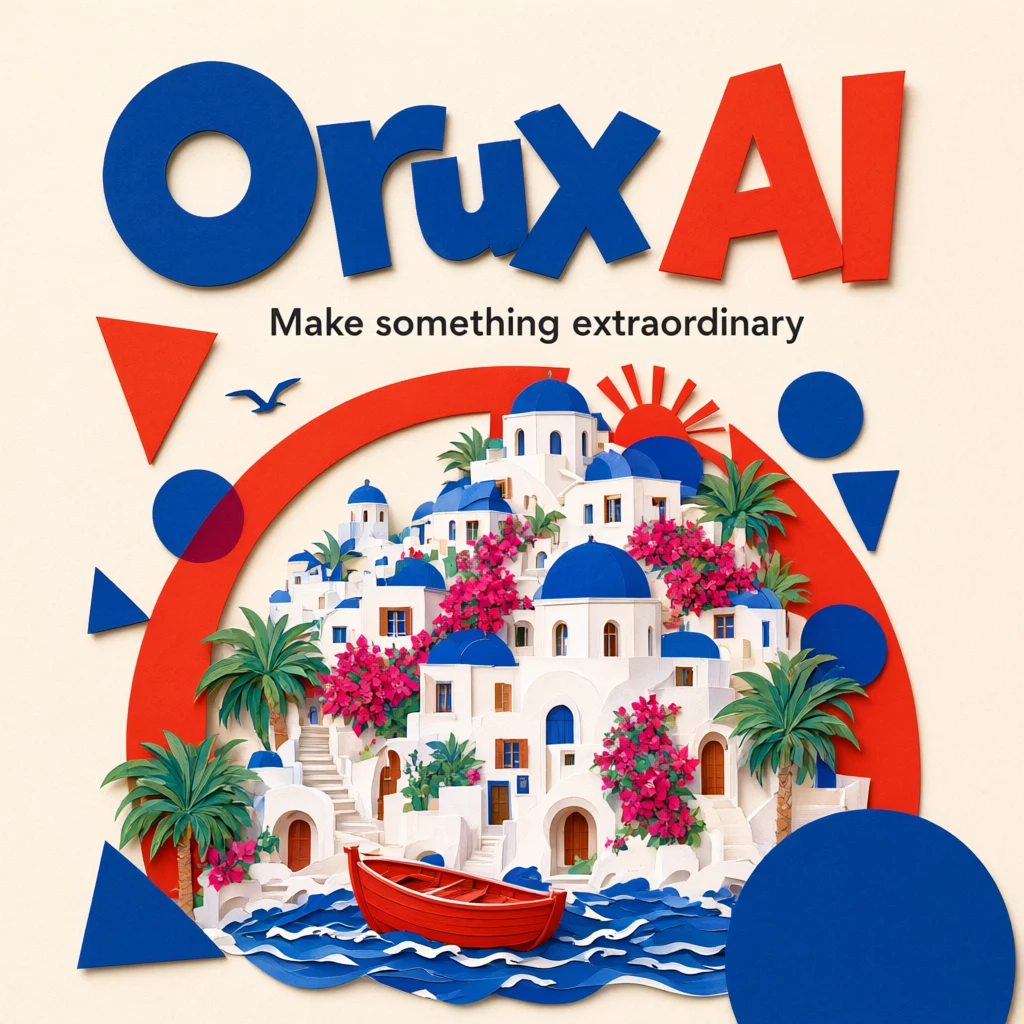
A busy brand poster can leave surprisingly little room for the brand itself. This Qwen Image 3.0 Pro example puts the headline at the top and builds a coherent scene with cream paper, red-and-blue cutouts and a seaside town. For an event teaser or a branded social graphic, study how it gives both lettering and imagery a clear job before adapting the brief.
The image and prompt come from the existing “Mediterranean paper art” example on the Orux model page. This is a text-to-image case, not a demonstration of preserving an uploaded product photo.
Read the image: lettering leads, the town tells the story
“Orux AI” fills the top of the image, with “Make something extraordinary” on a separate line beneath it. White buildings, blue domes and a red boat occupy the middle and lower area; surrounding geometric shapes echo the headline colors. The useful design lesson is the reading order: brand, short message, then scene detail.
That is an observation about this particular output, not proof of consistently accurate lettering. Check the spelling and compliance with your brand guidelines separately: correct words do not automatically make a correct logo.
Turn the visual brief into explicit instructions
This is the original saved English prompt. The English wording visible in the image is retained as part of the case:
A beautiful editorial poster for Orux AI, cream paper, bold tomato red and cobalt blue geometric shapes, cut paper illustration of a Mediterranean seaside town, playful typography. The main title reads exactly "Orux AI", subtitle reads "Make something extraordinary". Professional graphic design, crisp legible text.
| Prompt instruction | Its role in this poster | When adapting it |
|---|---|---|
| cream paper | Sets a light base and material direction | Choose a background that suits your brand |
| tomato red and cobalt blue | Establishes the main lettering and accent colors | Keep the palette limited and explicit |
| Mediterranean seaside town | Gives the composition a concrete subject | Replace it with one subject relevant to your event |
| main title / subtitle reads exactly | Separates two text levels and specifies spelling | Quote the final wording and keep it concise |
Swipe horizontally to view the full table.
“Professional design” communicates an expectation. Colors, a specific scene and two exact strings provide instructions you can actually inspect. They make the next revision easier to diagnose than a longer list of flattering adjectives.
Start with the template and change one design direction
The saved settings are 1K and 1:1, with no reference images supplied. Select “Mediterranean paper art” on the Qwen Image 3.0 Pro page to load the original settings, then edit them. Selecting a template does not initiate generation.
For a first variation, keep the paper-art style and red-and-blue palette while changing the headline, subtitle and subject. Once you understand their relationship, adjust color or aspect ratio separately. This is a suggested iteration workflow, not another completed example; an imagined variation is not the output shown here.
If you must reproduce an existing trademark faithfully, do not rely on text alone to redraw it precisely. Where typeface, spacing or brand colors must be exact, keeping a usable background and adding the approved logo and copy in a design tool makes verification easier.
Four checks before the poster goes live
- Proofread every character. Check spaces, capitalization, spelling and unwanted characters in both text lines.
- Reduce it to its intended display size. Can a viewer still read the subtitle and recognize the subject in a phone feed? A large preview is insufficient.
- Check the final crop. This case is square. A banner or portrait adaptation does not automatically keep the headline and boat inside a safe area.
- Confirm delivery requirements. This example supports a digital-poster concept. Print dimensions, bleed and brand fonts need separate work; the “1K” setting alone does not establish print readiness.
The reusable part is not the seaside town itself. It is a clear brief: two text levels, one subject and a coordinated palette. Review the generated result against the same checklist to decide what to keep and what to change next.
Case and form checked on October 27, 2026. The cover and body show the same original model example. English lettering inside the image is source material, not untranslated interface text.
Related articles
Browse all articles →
Kling 4.0: How to Choose Between Two Videos from the Same Prompt
Compare two existing Kling 4.0 desk shots on Orux through composition, subject identity and motion continuity, with original videos, settings and prompt.

DeepSeek Cafe Opening Copy: What to Check After It Sounds Good
A real DeepSeek V4.1 Flash cafe-opening response reveals why tone, length and promotional promises need separate checks. Includes the original request and output.