
Orux AI / Model notes
Seedream 5.0 Pro travel hero: crop a railway café without losing the story
Use an existing mountain railway café image to plan desktop and mobile crops, check signage and keep the scene readable.
On this page
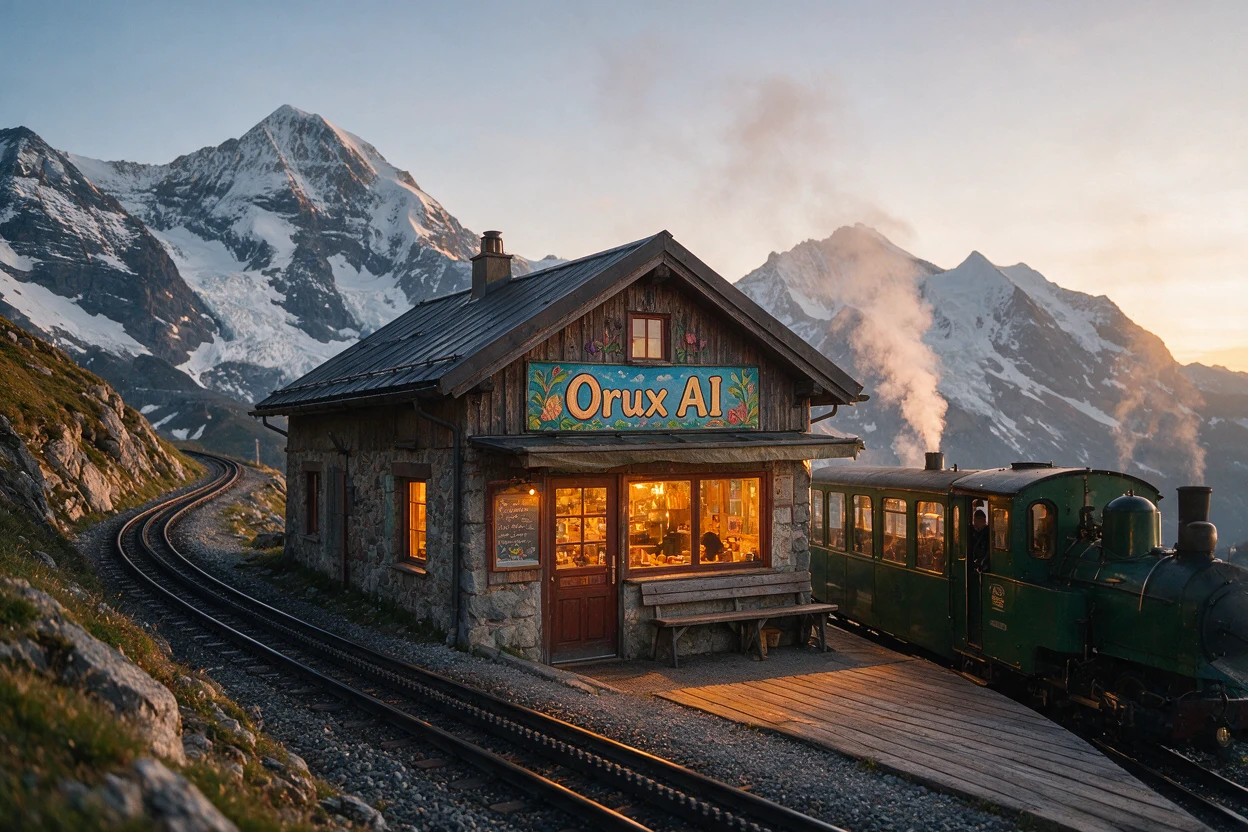
A travel hero should explain the setting before a headline competes for attention. This Seedream 5.0 Pro example places a café centrally, a train to the right and snowy peaks behind them. Their relationship is the useful part of the image.
Read the scene before cropping
Amber window light contrasts with cool mountains. Curving tracks lead toward the building; the green train establishes the railway setting. “Orux AI” is readable on the sign. That is an observation of this output, not a promise of reliable lettering across generations.
*Existing Orux model example: an AI-generated scene, not a photograph of a verified destination or a new generation for this article.*
Keep the original brief
Editorial travel photograph of a tiny mountain railway cafe at sunrise, forest green train beside a wooden platform, snowy peaks, steam and warm amber window light. A beautifully painted cafe sign reads exactly "Orux AI". Natural colors, rich photographic detail, no purple.The saved template uses 1K, 3:2. The public file is 1248 × 832; the 1K option does not imply an edge of exactly 1,000 pixels. Keep the original English prompt to preserve its subject, sunrise, green train, steam and exact sign text.
Plan two layouts
A full-width 16:9 crop at 1248 pixels is approximately 702 pixels high, removing about 130 pixels vertically. Try taking more from the lower platform while preserving the roof and sign; then check the headline against the peaks.
A 9:16 crop preserving the original height leaves only about 468 pixels of width. A central crop could lose both the train and left-hand tracks. To retain the whole story, use the full image with background space or generate a new composition with explicit priorities. These are geometric estimates, not produced crop variants.
Check before publishing
- Read the sign at actual phone size and verify important brand text character by character.
- Test the headline in the real layout; avoid covering the roof, steam or peaks.
- Inspect track direction, train outlines and steam edges. Attractive imagery does not prove physical accuracy.
- Label conceptual travel imagery as AI-generated. For a real property or destination, use verified location material.
Load the template in Seedream 5.0 Pro. Change one variable next, such as a portrait composition with a clear subject priority, and save the result before comparing. This example supports a travel-style visual concept, not the existence of a real location.
Sources and case checked on 2026-10-28. The official catalog lists a multimodal image generation model; this does not establish that Orux exposes every vendor feature. ByteDance Seed · Seedream 5.0 Pro
Related articles
Browse all articles →
Qwen Image 3.0 Pro Poster Prompts: A Paper-Art Brand Example
Break down a real Qwen Image 3.0 Pro poster from Orux: title hierarchy, red-and-blue color choices, the original prompt and settings, and practical delivery checks.

DeepSeek Cafe Opening Copy: What to Check After It Sounds Good
A real DeepSeek V4.1 Flash cafe-opening response reveals why tone, length and promotional promises need separate checks. Includes the original request and output.

Kling 4.0: How to Choose Between Two Videos from the Same Prompt
Compare two existing Kling 4.0 desk shots on Orux through composition, subject identity and motion continuity, with original videos, settings and prompt.