
Orux AI / Model notes
Qwen Image 3.0 API: Pricing, Pro vs Standard, Python
Qwen Image 3.0 API costs 6 Credits ($0.03) per image on Orux AI; Pro starts at 10.42 Credits. Compare both tiers, a real poster prompt and Python code.
On this page
Qwen Image 3.0 costs 6 Credits ($0.03) per image on Orux AI, the same as Alibaba's own list price. Qwen Image 3.0 Pro costs 10.42 Credits ($0.052) at 1K and 20.83 Credits ($0.104) at 2K, which is 30–39% more than buying Pro directly from Alibaba Cloud. Both run through one asynchronous endpoint, POST https://orux.top/api/v1/tasks, with the same API key you use for chat models.
That second sentence matters, so this article starts with it rather than burying it. If Pro is the only model you need and you are happy to manage a separate Alibaba Cloud account, buying it direct is cheaper. The rest of the article covers when the standard model is enough, what Pro adds on Orux, a working Python script, and a real poster prompt broken down instruction by instruction.
Qwen Image 3.0 vs 3.0 Pro pricing
All Orux AI prices are in Credits at a fixed 1 Credit = $0.005. Prices as of Oct 29, 2026.
| Model | Orux AI price per image | Alibaba Cloud list price | Orux / official |
|---|---|---|---|
| Qwen Image 3.0, 1K | 6 Credits ($0.030) | $0.03 | 100% |
| Qwen Image 3.0 Pro, 1K | 10.42 Credits ($0.052) | $0.04 | 130% |
| Qwen Image 3.0 Pro, 2K | 20.83 Credits ($0.104) | $0.075 | 139% |
| Pro, each reference image | +0.83 Credits ($0.0042) | not compared | — |
| Wan2.7 Image, 1K or 2K | 5.42 Credits ($0.027) | $0.03 | 90% |
| Wan2.7 Image Pro, 1K or 2K | 13.54 Credits ($0.068) | $0.075 | 90% |
Swipe horizontally to view the full table.
Official prices come from the Alibaba Cloud Model Studio pricing page (link in the sources section). The reference-image surcharge is the Orux AI rate; we did not find a matching line on the official page, so there is no ratio for it.
Three things stand out.
First, the standard model is priced at parity. If text-to-image at 1K square is all you need, there is no markup to think about.
Second, Pro is where Orux AI is more expensive than going direct. A Pro image with three references at 2K costs 23.33 Credits ($0.117) on Orux AI. The reasons to accept that are operational, not price: one key and one balance across chat, image and video models, failed tasks are not charged, and the same submit-and-poll code works for every image model on the platform.
Third, if the job is a stylised poster rather than precise multilingual typography, Wan2.7 Image is the price alternative from the same vendor family: 5.42 Credits at either 1K or 2K, up to 9 reference images with no reference surcharge, at 90% of the official price.
What Pro adds over the standard model
On Orux AI the two models are configured quite differently. This table lists what each one accepts through the API today:
| Capability | Qwen Image 3.0 | Qwen Image 3.0 Pro |
|---|---|---|
| Input | Text only | Text plus up to 3 reference images |
| Resolution | 1K | 1K or 2K |
| Aspect ratio | 1:1 | 1:1, 4:3, 3:4, 16:9, 9:16, 3:2, 2:3 |
| Images per request | 1 | 1 |
| Editing an existing image | No | Yes, via image_urls |
| Price at 1K | 6 Credits | 10.42 Credits |
Swipe horizontally to view the full table.
So the practical difference is not just quality. The standard model on Orux AI is a square, 1K, text-to-image endpoint. Anything else — a 16:9 banner, a 9:16 story, a 2K print proof, or editing a product photo — needs Pro.
The vendor positions Pro for multilingual typography, posters and complex layouts. We have not run a controlled side-by-side test of lettering accuracy between the two, so this article does not claim Pro renders text better. What we can show is one real Pro output and its prompt, below.
Call the Qwen Image 3.0 API from Python
Image models on Orux AI are asynchronous. You submit a task, get a task_id back with HTTP 202, and poll until the status is SUCCESS, FAILED or EXPIRED. Only SUCCESS is billed. There is no callback option; polling is the only way to get the result.
Create a key at orux.top/keys (the full key is shown once), then export it as ORUX_API_KEY.
import os, time, requests

BASE = "https://orux.top/api/v1"
HEADERS = {"Authorization": f"Bearer {os.environ['ORUX_API_KEY']}"}

# Orux AI rates in Credits, checked 2026-10-29
PRO_BASE = {"1K": 10.417, "2K": 20.8336}
PRO_PER_REFERENCE = 0.8334

def estimate_pro_credits(resolution: str, references: int) -> float:
    if references > 3:
        raise ValueError("Qwen Image 3.0 Pro accepts at most 3 reference images")
    return round(PRO_BASE[resolution] + PRO_PER_REFERENCE * references, 4)

def generate(model: str, payload: dict, out_prefix: str) -> list[str]:
    r = requests.post(f"{BASE}/tasks", headers=HEADERS,
                      json={"model": model, "input": payload}, timeout=60)
    if r.status_code == 402:
        raise RuntimeError("Balance too low: top up, this is not an auth error")
    r.raise_for_status()
    task_id = r.json()["task_id"]
    print("submitted", task_id)

    while True:
        time.sleep(5)
        t = requests.get(f"{BASE}/tasks/{task_id}", headers=HEADERS, timeout=30).json()
        if t["status"] not in ("QUEUED", "RUNNING"):
            break
    if t["status"] != "SUCCESS":
        raise RuntimeError(t.get("error") or t["status"])  # not charged

    paths = []
    for i, url in enumerate(t["result"]):
        path = f"{out_prefix}_{i}.png"
        with open(path, "wb") as f:
            f.write(requests.get(url, timeout=120).content)  # result URLs expire
        paths.append(path)
    return paths

# 1) Standard model: text-to-image, 1K, square only
generate("qwen-image-3.0", {
    "prompt": 'Minimal paper-cut poster of a lighthouse at dawn. '
              'Include the clear words "HARBOR DAYS". No other text.',
    "resolution": "1K",
    "aspect_ratio": "1:1",
}, "standard")

# 2) Pro: 16:9 banner at 2K with one reference image
refs = ["https://example.com/your-product-photo.jpg"]
print("estimate:", estimate_pro_credits("2K", len(refs)), "Credits")
generate("qwen-image-3.0-pro", {
    "prompt": 'Place the product from the reference on a cream paper-art stage. '
              'Headline reads exactly "Summer Edition". Clean margins.',
    "image_urls": refs,
    "resolution": "2K",
    "aspect_ratio": "16:9",
}, "pro")
A few practical notes from building against this endpoint:
- Save the
task_idbefore you start polling. If your process restarts, resume polling the same task instead of submitting again and paying twice. - Result URLs are temporary. Download the file as soon as the task succeeds and store it yourself.
- A
402means the balance is too low. Handle it separately from401(bad key) so your alerting points at the right fix. - On
429, back off exponentially with jitter rather than retrying immediately. qwen-image-3.0only accepts 1K and 1:1 without reference images. For any other ratio, 2K or an edit, switch the model toqwen-image-3.0-prorather than expecting the standard model to adapt.
Poster case study: lettering first
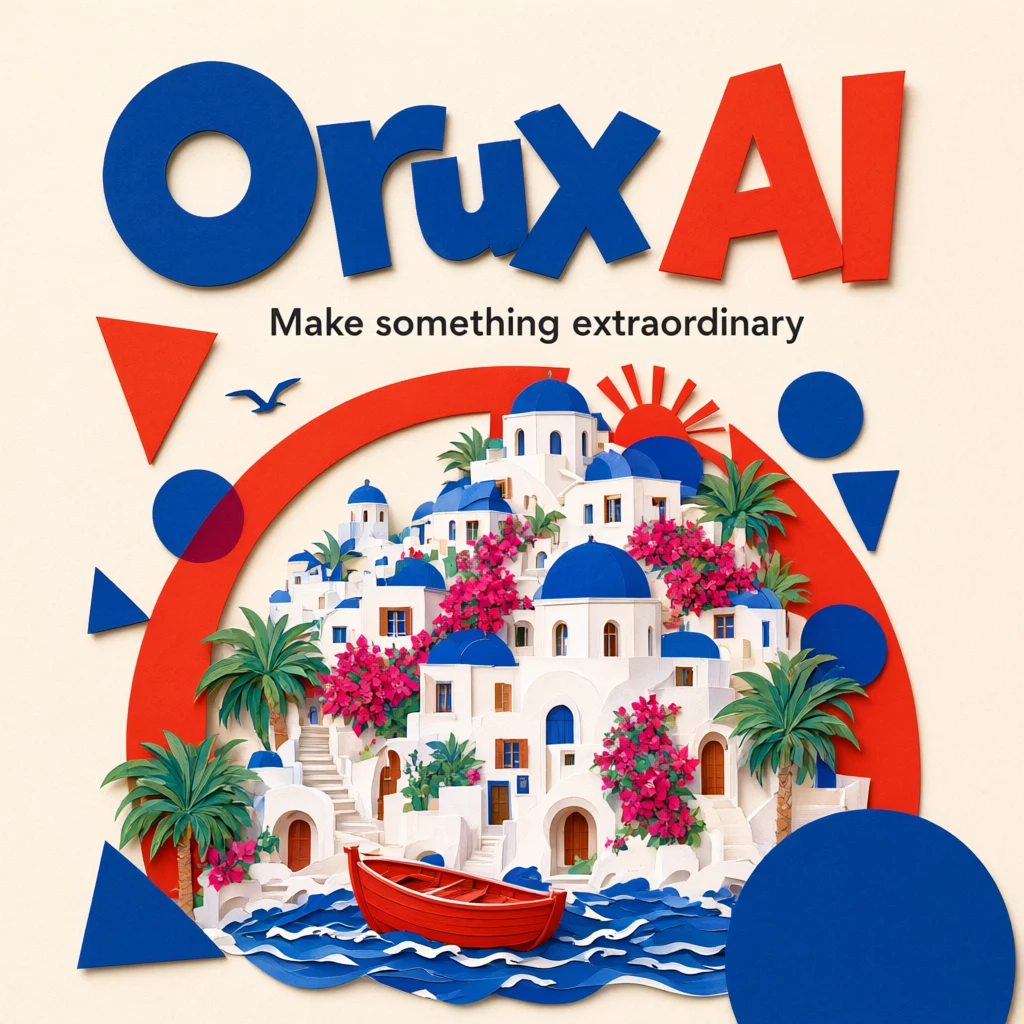
This is an existing Orux example from the Qwen Image 3.0 Pro model page, saved as the "Mediterranean paper art" template. It is a text-to-image case: no reference images were supplied. Settings were 1K and 1:1, and the saved file is 1024×1024 pixels.
The original prompt, unchanged:
A beautiful editorial poster for Orux AI, cream paper, bold tomato red and
cobalt blue geometric shapes, cut paper illustration of a Mediterranean
seaside town, playful typography. The main title reads exactly "Orux AI",
subtitle reads "Make something extraordinary". Professional graphic design,
crisp legible text.
"Orux AI" fills the top of the frame, with "Make something extraordinary" on its own line beneath. White buildings, blue domes and a red boat sit in the middle and lower half; loose geometric shapes repeat the headline colors. In this output both strings are spelled correctly. That is an observation about one image, not evidence that every run gets lettering right.
The useful lesson is the reading order the prompt sets up: brand, then a short message, then the scene. Here is what each instruction contributes:
| Prompt instruction | Its role in this poster | When adapting it |
|---|---|---|
| cream paper | Light base and a material direction | Pick a background that suits your brand |
| tomato red and cobalt blue | Lettering and accent colors | Keep the palette short and name it explicitly |
| Mediterranean seaside town | One concrete subject for the image area | Replace with a single subject tied to your event |
| main title / subtitle reads exactly | Two text levels, exact spelling | Quote the final wording and keep it short |
Swipe horizontally to view the full table.
Notice that "professional graphic design" and "crisp legible text" express an expectation but give the model nothing checkable. The palette, the single subject and the two quoted strings are what make the next revision easy to diagnose. When a result is wrong, you can tell which instruction it ignored.
For a first variation, keep the paper-art style and the red-and-blue palette and change only the headline, subtitle and subject. Change color or aspect ratio in a separate run, so you know which edit caused which difference. Selecting the template on the model page fills the form but does not start a paid generation.
If you need to reproduce an existing logo exactly, do not rely on the model to redraw it. Generate the background and illustration, then place the approved logo and copy in a design tool. It is faster to verify and avoids subtle letterform drift.
Four checks before the poster ships
- Proofread every character. Check spaces, capitalisation, accents and stray glyphs in each text line. The standard-model example on the Qwen Image 3.0 page asks for "ORUX CAFÉ", which is a quick way to see whether an accented letter survives.
- View it at its real display size. Shrink it to the size of a phone feed post. If the subtitle is no longer readable, shorten it or make it larger in the prompt.
- Check the final crop. This example is square. A banner or story version will not automatically keep the headline and boat inside a safe area, so generate the target ratio with Pro instead of cropping.
- Confirm delivery requirements. A 1K square suits a digital poster concept. Print sizes, bleed and brand fonts need separate work; the resolution setting alone does not make an image print-ready.
When to pick Standard, Pro or Wan2.7 Image
Use Qwen Image 3.0 for square social graphics and quick concept tests where text-only input is enough. At 6 Credits per image it costs the same as going direct, and you can batch dozens of drafts for a few dollars.
Use Qwen Image 3.0 Pro when you need a non-square ratio, 2K output, or edits that start from a product photo or brand asset. Budget 10.42–12.92 Credits at 1K and 20.83–23.33 Credits at 2K, depending on how many references you attach. If Pro is your only workload and volume is high, compare against the direct price before committing.
Use Wan2.7 Image when you need more references (up to 9) or 2K output at a lower price, and can accept a different model's style. For a wider view across image models, see our cheapest image generation API comparison and the Seedream 5.0 Pro pricing and crop test.
FAQ
How much does the Qwen Image 3.0 API cost?
On Orux AI, Qwen Image 3.0 costs 6 Credits ($0.03) per image, equal to Alibaba Cloud's list price. Qwen Image 3.0 Pro costs 10.42 Credits ($0.052) at 1K and 20.83 Credits ($0.104) at 2K, plus 0.83 Credits per reference image. Prices as of Oct 29, 2026.
Is Qwen Image 3.0 Pro better at text?
We have not run a controlled comparison, so we cannot say. In the two existing Orux examples, the standard model rendered "ORUX CAFÉ" and Pro rendered "Orux AI" plus a subtitle without spelling errors. Those are single outputs with different prompts, not a benchmark. Proofread every result before publishing.
Can Qwen Image 3.0 edit images?
On Orux AI, only the Pro model accepts input images. Pass up to 3 public image URLs in image_urls and describe the change in the prompt. Each reference adds 0.83 Credits. The standard model is text-to-image only and rejects reference images.
Which aspect ratios work?
Qwen Image 3.0 Pro supports 1:1, 4:3, 3:4, 16:9, 9:16, 3:2 and 2:3 at 1K or 2K; exact pixel dimensions vary with the ratio. The standard model on Orux AI accepts 1:1 at 1K only, so use Pro for banners and vertical formats.
Am I charged if a generation fails?
No. Image tasks are billed only when they reach SUCCESS. Tasks that end as FAILED or EXPIRED cost nothing. Billing is prepaid with no monthly fee, and the charge is per successful image at the rate shown on the model page.
Sources and price check
Prices checked on 2026-10-29. Orux AI rates come from the public model pages: Qwen Image 3.0, Qwen Image 3.0 Pro and Wan2.7 Image. Official prices: Alibaba Cloud Model Studio pricing. Prices change; re-check the model page before you budget a large job.
Build with these models through one API
One OpenAI-compatible API for chat, image, video and audio models, billed in Credits.
Related articles
Browse all articles →
Seedream 5.0 Pro API: Price per Image, Sizes and Crop Test
Seedream 5.0 API pricing: Pro costs 10.5 Credits ($0.0525) per 1K image on Orux AI. See official tiers, reference-image fees, real output sizes and a crop test.
Seedance 2.0 API Pricing: 2.0 vs Fast vs Mini vs 2.5
Seedance 2.0 API on Orux AI: Mini from 12.59 Credits ($0.063) per second at 480p, 2.0 at 720p is 61.5 Credits. Compare four tiers, clip costs and Python code.
GPT Image 2.5 API: Price per Image and Flare vs Sunburst
GPT Image 2.5 API costs 5.4 Credits ($0.027) per 1K image on Orux AI for Flare or Sunburst. Compare token-based OpenAI pricing, speed and a working Python call.