
Orux AI / Model notes
Suno v5 Audio Handoff: Measure LUFS and True Peak
Measure a real Suno v5 MP3, calculate fixed gain, and verify the loudness and true peak of a stereo WAV with FFmpeg.
On this page
Bring the audio to the brief with a measured gain change
The existing Orux Suno v5 example “Frog pond chorus” needed a 2.32 dB reduction to meet an example handoff brief of −16 LUFS integrated loudness and a true peak no higher than −2 dBTP. The original stereo MP3 measured −13.68 LUFS and −0.35 dBTP. An offline gain change produced a 48 kHz WAV that measured −16.00 LUFS and −2.67 dBTP. The measured loudness range was 4.90 LU in both files.
This guide is for an editor delivering a stereo music bed to a colleague who has specified those targets. Use your actual delivery specification in production. A sound bed delivered to an editor is also different from a finished podcast or video mix: when speech and music are combined, the final mix has to be checked separately. The goal here is to keep an approved track and make a technically compliant copy for handoff.
Start with the approved source
The Suno v5 model page has a public instrumental example labeled “Frog pond chorus”. Its prompt asks for an interlocking call and response between woodblocks and marimba, inspired by a summer pond at night. The source file decodes as stereo MP3 at 48 kHz and has a reported container duration of 166.8 seconds. The WAV in this workflow is a local derivative of that existing file.
Listen to or save the original Frog pond chorus MP3.
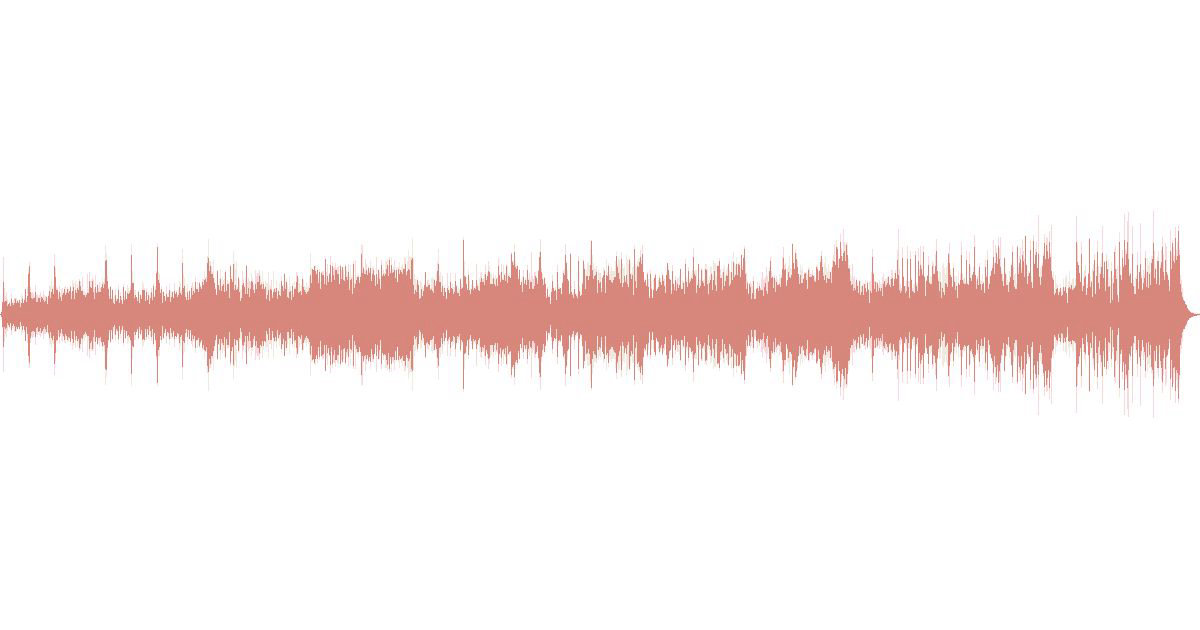
The waveform shows changes in amplitude across the track. It helps an editor locate sections to audition and identify a broad change in level over time. It cannot tell you the integrated loudness or maximum true peak at a glance. Those come from the measurements. Likewise, a track can meet the numerical specification and still compete with speech at a particular point. Listen to the intended excerpt against dialogue before approving it for a mix.
Keep the downloaded file unchanged as your source of record. Name the export separately and note the trim, fade, gain and format in the handoff. This workflow applies a constant gain and keeps the full arrangement. If the editor only needs an excerpt, measure the selected span after trims and fades. The average over a full track does not establish the loudness of a short excerpt.
Read loudness and peaks as separate constraints
Integrated loudness, in LUFS, describes the program over the measured span. True peak, in dBTP, estimates the maximum level of the reconstructed signal, including between samples. Loudness range, in LU, describes variation in loudness across the program. The three values answer different questions. A true peak close to full scale can occur in a track whose integrated loudness still needs an increase. A broad waveform does not tell you which constraint the exported file will fail.
For a constant gain adjustment, subtract measured integrated loudness from the target. Here, −16.00 − (−13.68) = −2.32 dB. Add that gain to the input true peak to estimate the output peak before encoding: −0.35 + (−2.32) = −2.67 dBTP. That is 0.67 dB below the example ceiling of −2 dBTP. Both checks point to the same decision: attenuate the approved track by a fixed amount and measure the result.
If your calculated peak would exceed the ceiling, the requested loudness and peak ceiling cannot both be reached by a constant gain alone. For example, a track measuring −20 LUFS and −3 dBTP needs +4 dB to hit −16 LUFS, which predicts +1 dBTP. Under a −2 dBTP ceiling, it can take only +1 dB of constant gain, yielding roughly −19 LUFS. At that point, decide whether to change the handoff target or approve dynamics processing. The difference is audible on some material, so check the result against the brief.
The calculation uses the measurements as a forecast. Filtering, fades, level gating and lossy encoding can change what a subsequent measurement reports. Treat the final readout on the actual delivery file as the acceptance result. The WAV export here uses PCM and keeps the existing sample rate. If the delivery destination requires MP3 or AAC, encode from the accepted edit and measure the encoded file before handing it over.
Measure, export and measure again with FFmpeg
Save the original as frog.mp3 in a folder where you can create a WAV. Install FFmpeg with the loudnorm filter available. In this example the first and last commands analyze the file. Their processed audio is discarded. Read the input_i, input_tp and input_lra fields in each JSON report because those fields describe the file you supplied. The middle command writes the actual deliverable.
ffmpeg -hide_banner -nostats -i frog.mp3 \
  -af loudnorm=I=-16:TP=-2:LRA=11:print_format=json -f null -
ffmpeg -i frog.mp3 -af volume=-2.32dB -ar 48000 \
  -c:a pcm_s24le frog-handoff.wav
ffmpeg -hide_banner -nostats -i frog-handoff.wav \
  -af loudnorm=I=-16:TP=-2:LRA=11:print_format=json -f null -
The analysis commands specify the example target so you can compare reports from the same filter settings. The output_* values printed by those analysis runs describe the filter's proposed output, which is sent to the null sink. They are not measurements of the WAV written by the volume command. For example, the first analysis reported a dynamic-mode output loudness of −14.74 LUFS. Reading that line as the original loudness would produce the wrong gain. The FFmpeg loudnorm documentation describes the integrated loudness, range and true peak targets.
| Local measurement | Original MP3 | Exported WAV |
|---|---|---|
| Integrated loudness | −13.68 LUFS | −16.00 LUFS |
| True peak | −0.35 dBTP | −2.67 dBTP |
| Loudness range | 4.90 LU | 4.90 LU |
| Sample rate and channels | 48 kHz stereo | 48 kHz stereo |
Swipe horizontally to view the full table.
At the recorded precision, the WAV reaches the example loudness target and stays under the true peak ceiling. The unchanged measured loudness range is consistent with the fixed gain used here. Exporting to 24-bit PCM also gives the next editor an uncompressed working copy. It does not recover information lost in the original MP3. Leave the WAV available for editing and make any required compressed copy from it.
Before closing the handoff, play the beginning, a busy middle passage and the tail at your normal monitoring level. Check that the stereo placement still suits the cut and that the export starts and ends where expected. A loudness meter cannot detect an unintended edit at the start or tell whether an ending feels abrupt. Include a line in the delivery note such as “48 kHz stereo PCM, −16.00 LUFS integrated, −2.67 dBTP, measured over the full file.” That gives the next editor enough information to distinguish the delivery check from any later change they make in the timeline.
Budget for a new composition when the creative brief changes
On 2026-11-06, Orux listed the Suno v5 generation price at 14.24016 Credits per request ($0.0712008 at 1 Credit = $0.005). The price applies per request. The two request counts below are budget examples. They say nothing about the number of approved tracks a request will yield.
| Work planned | Orux request count | Cost |
|---|---|---|
| Apply the measured gain and verify the existing file locally | 0 | 0 Credits ($0) |
| Request one new composition | 1 | 14.24016 Credits ($0.0712008) |
| Budget a second request for a different creative direction | 2 | 28.48032 Credits ($0.1424016) |
Swipe horizontally to view the full table.
A new composition makes sense when the pacing, arrangement or instrument choices do not suit the edit. A gain correction is enough when the track is approved and the remaining problem is level. The 166.8-second example is a file measurement, so use the per-request price for your budget. When comparing multiple candidates, decide what makes the track usable before requesting variants. The cost per accepted image guide uses a similar budgeting distinction in a different medium, separating request price from the cost of selecting an approved result. If your edit includes generated narration, see the Qwen3 TTS text preparation guide for the earlier preparation stage.
FAQ
Should every music bed target −16 LUFS?
Use the target specified by the receiving editor or delivery destination. −16 LUFS is the example brief used here. A bed may sit lower in the final mix so that dialogue stays intelligible. Recheck loudness and peaks on the final mixed export when that file is part of the delivery.
Why check true peak if I already know the loudness?
Integrated loudness describes the measured span overall, while true peak catches short reconstructed peaks. A track can pass the loudness target while exceeding the peak ceiling. Measure both on the delivery file, especially after a lossy encode, and document the target and measured values together.
Is the input or output number in the FFmpeg report the source measurement?
Use the input fields for the file passed to the command. The output fields describe the audio processed by the filter. In an analysis run that sends output to the null sink, no processed file is retained. Run the same analysis on your WAV to verify the actual export.
Do I need to generate the Suno track again to change its loudness?
A local gain adjustment is sufficient if the current composition is approved and the projected peak stays within the ceiling. Keep the original, export a derivative and measure it. Generate a new track when the arrangement or other creative requirements call for a different source.
Build with these models through one API
One OpenAI-compatible API for chat, image, video and audio models, billed in Credits.
Related articles
Browse all articles →
Claude Sonnet 5.5 API: Python, JSON Output and Cost per Call
Call the Claude Sonnet 5.5 API from Python with the OpenAI SDK, validate JSON output, and see real per-call cost: 190/950 Credits per 1M tokens on Orux AI.

GPT Image 2.6 GIFs: Flare vs Sunburst in Two Real Examples
Compare two real GPT Image 2.6 GIFs, check Flare and Sunburst prices on Orux, and use Python to verify frames, looping and file size.

Qwen3 TTS API: Lossless Text Chunking in Python
Prepare Qwen3 TTS API inputs with a Python splitter that preserves every character and rejects oversized segments. Check text boundaries before synthesis; this guide does not claim measured audio quality.