
Orux AI / Model notes
GPT Image 2.6 GIFs: Flare vs Sunburst in Two Real Examples
Compare two real GPT Image 2.6 GIFs, check Flare and Sunburst prices on Orux, and use Python to verify frames, looping and file size.
On this page
Which GPT Image 2.6 GIF should you make first?
Start with GPT Image 2.6 Flare when the brief is a recognizable action, such as an app mascot waving hello. Start with GPT Image 2.6 Sunburst when the brief is a mostly still composition with a small animated detail, such as steam above a cup. These are starting points for a creative test. Orux already has one public example for each brief, and you can inspect both below. The examples use different prompts, so they cannot establish which model would handle the same brief better.
For an Orux GIF, the two model pages currently list the same 768 × 512, 3:2 format at high quality. The decision is therefore less about output dimensions and more about what the viewer needs to notice. A mascot has to convey the gesture even when scaled down. A product loop has to preserve the appearance of the product while the accent moves. For either one, approve the still and the transition back to the beginning before approving the animation.
Flare: make the action readable at the size people see
The existing GPT Image 2.6 Flare example asks for a centered orange fox against lavender, a fixed camera and shadow, and a small sequence: raise a paw, wave twice, blink, lower the paw and return to the starting pose. Its output is a finished GIF, which means the individual animation frames are already in the file. You do not have to split a sprite sheet or guess how the tiles are ordered.
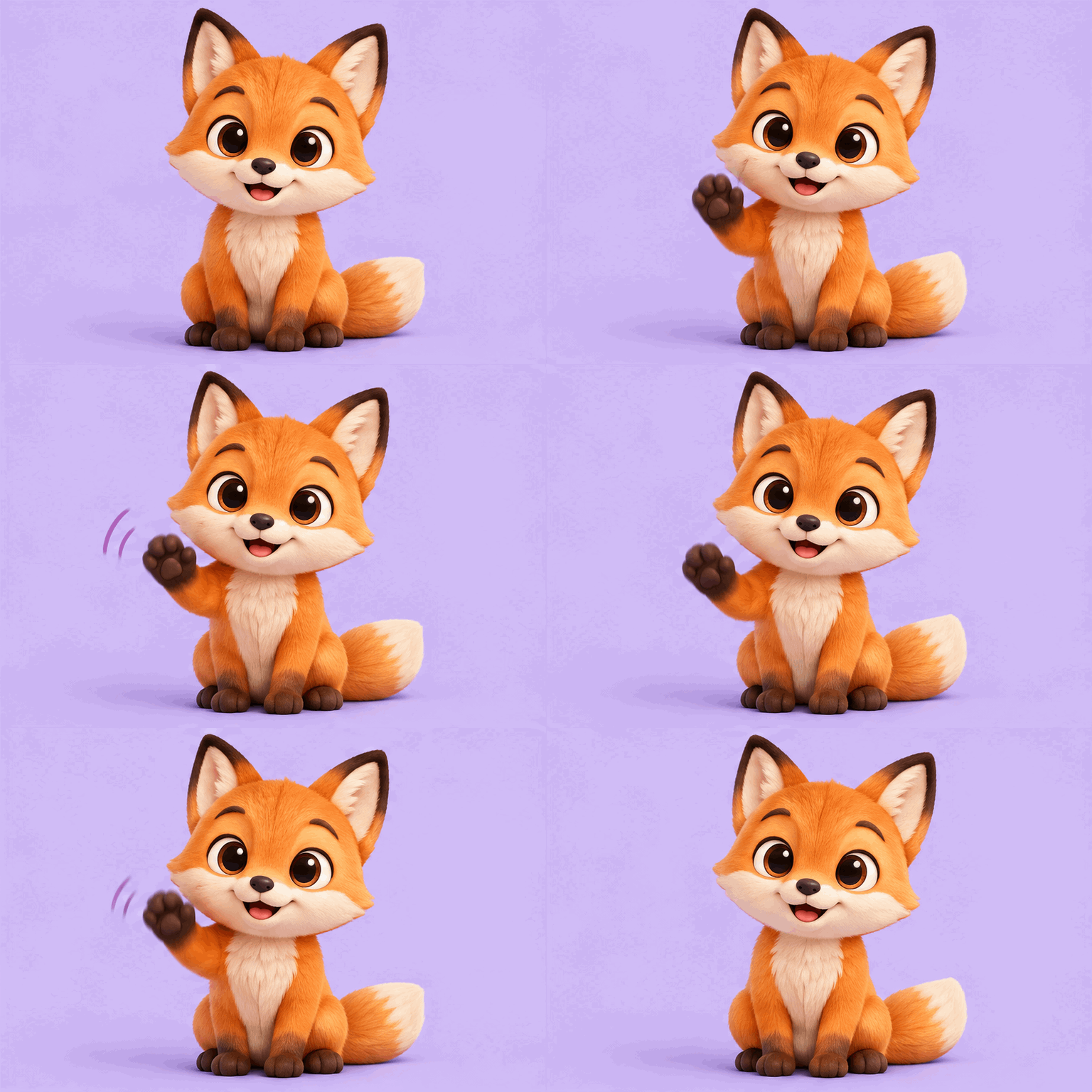
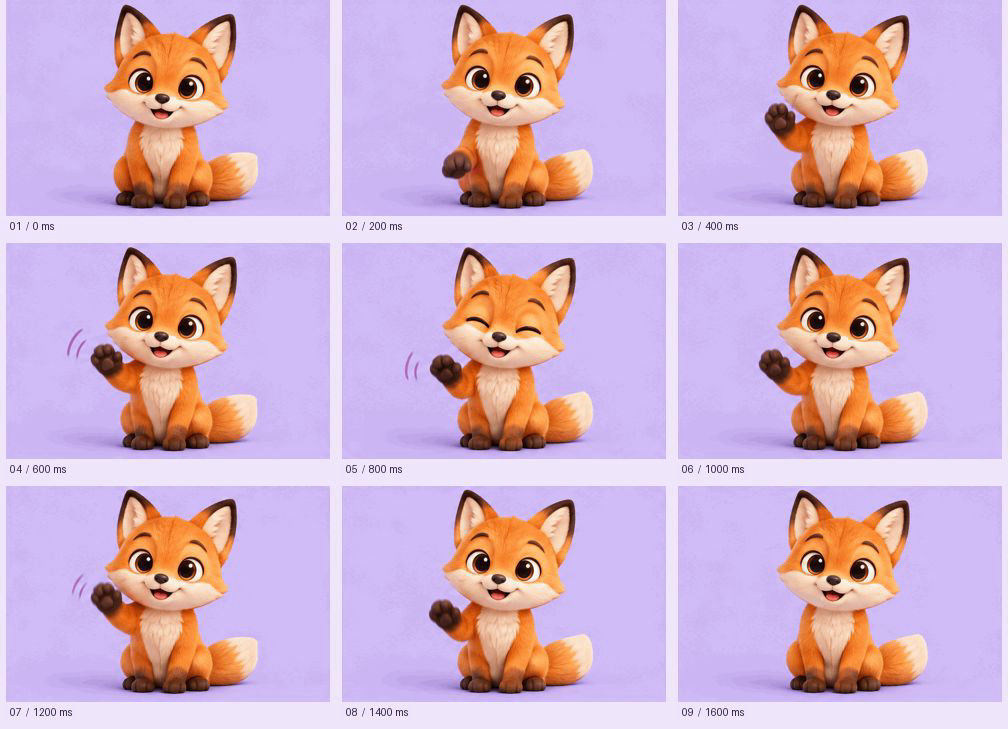
The first frame establishes the seated pose. By 400 milliseconds the paw is raised, at 800 milliseconds the eyes close, and at 1,600 milliseconds the paw is down again. The drawing also introduces purple motion marks in some of the middle frames. Those marks help the wave read as a gesture. They are a detail to review if the brand illustration has to remain clean; the brief asked for no background effects, and a designer may count the marks as an extra graphic.
Review the original loop once at the actual size of the welcome card. Check whether the paw still reads distinctly against the face and whether the gesture is legible before the user moves on. Then review the first and last thumbnails side by side. The seated pose comes back, which is a better starting point for a loop than cutting while the paw is still in the air. The sheet does not prove that the final transition is invisible in motion.
For a new mascot brief, describe one action and what must stay fixed. For example, specify which paw moves, where it ends, and whether illustrated motion lines are allowed. Put the app title and continue button in the interface so they stay readable and actionable with the animation disabled. The character should add personality; the welcome screen should still explain what to do without it.
Sunburst: keep the product stable while one detail moves
The existing GPT Image 2.6 Sunburst example asks for a terracotta cup, saucer, spoon and beans in a fixed composition. The intended movement is limited to the steam. It is a useful reference for a restrained product loop because you can compare a moving region above the cup with relatively stable edges below it.
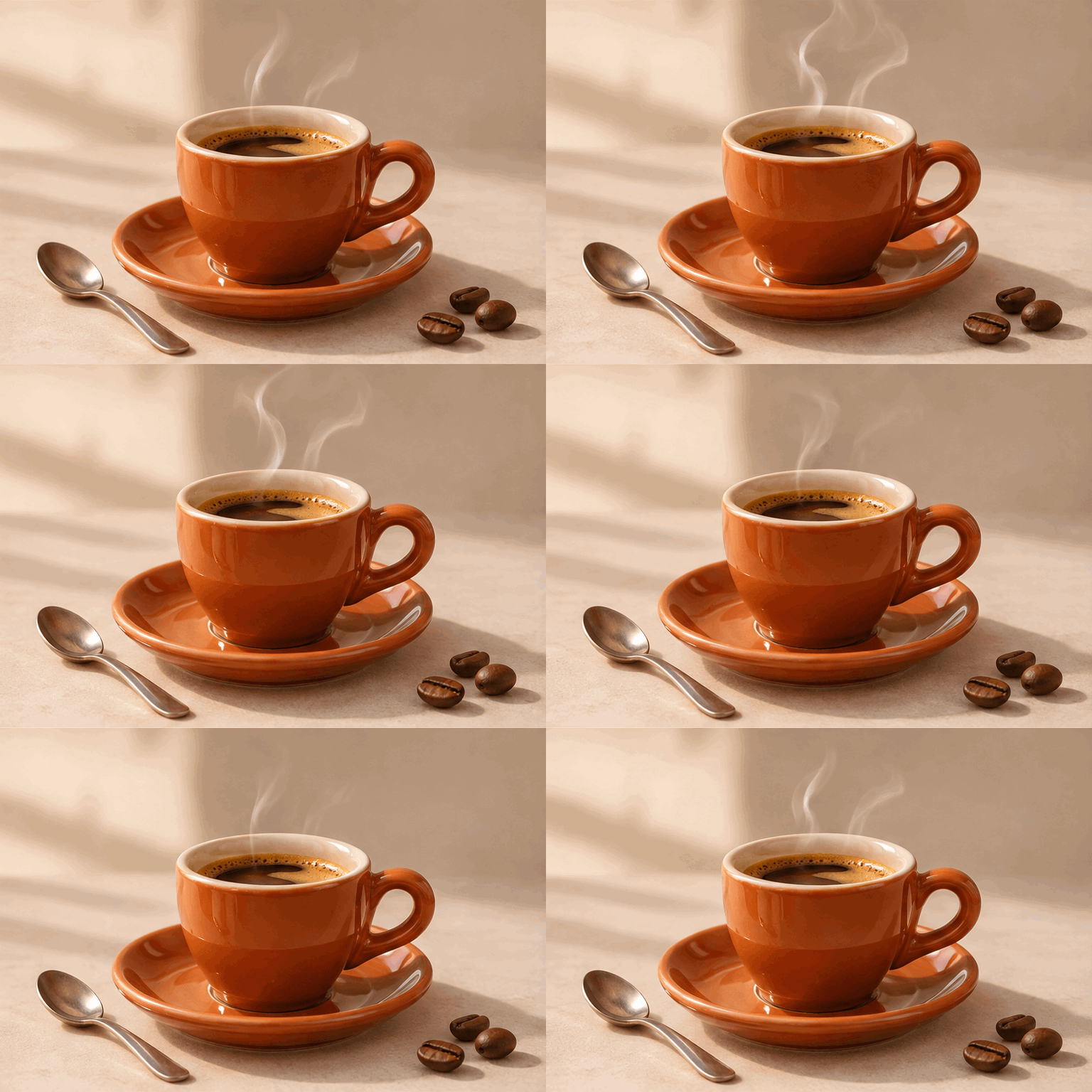
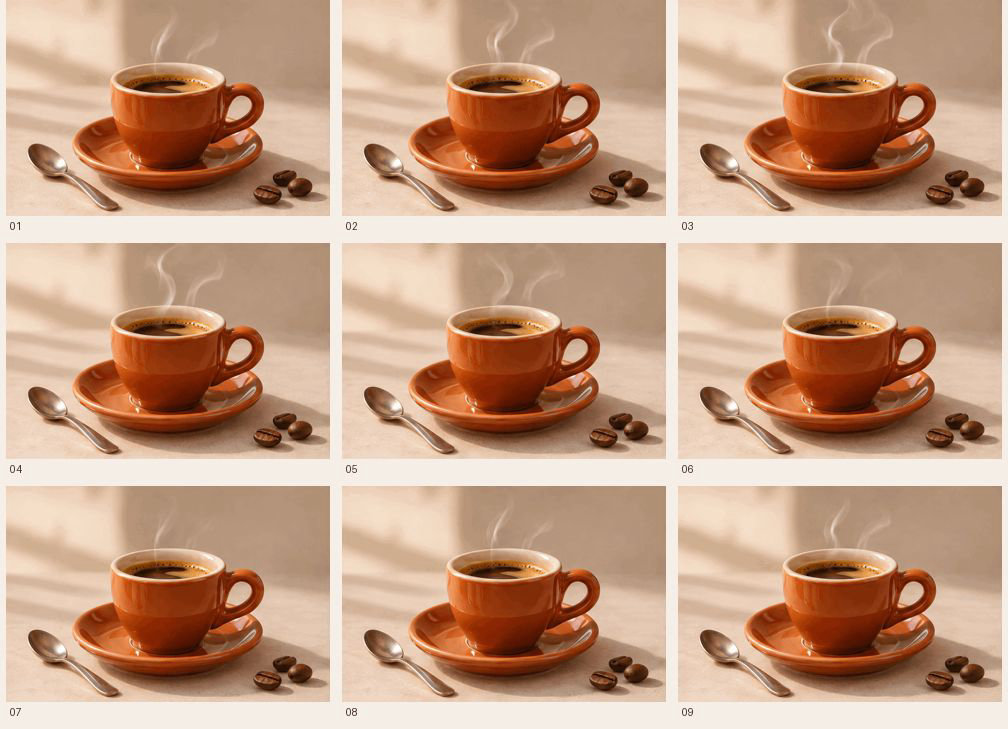
The frame sheet shows the steam curling, thinning and reforming. The handle, saucer, spoon and beans keep their apparent positions at this viewing size. That is a visual observation from this file; it does not certify that every pixel outside the steam is identical. Inspect the handle silhouette and highlight at full size if the file is being approved as a product visual. This example is a generated concept rather than a reference edit of an actual SKU. The prompt does not establish that the model can reproduce any particular real cup.
A useful prompt for this kind of loop identifies the single region allowed to change, then names the objects, camera and exposure that should stay fixed. Make the baseline pose attractive on its own. For example, if the asset goes in an email, verify the first frame in the intended client and keep the offer text in the email. It should still make sense when the animation does not play. The asset can also work as a static hero if the motion adds little to the message.
Compare the Orux settings and the cost of a review round
The OpenAI release announcement positions Flare for rapid iteration and Sunburst for more detailed visual work. The official image generation guide describes native options including GIF, SVG and complexity. Those are capabilities of the official Image API. For these specific Orux model pages, the visible format choices are 1K, 2K and GIF, and the GIF option uses 3:2 and high quality. Choose from the controls on the page where you are generating the asset; do not copy the full set of native API parameters into a different form.
| Orux preset | Flare, per output | Sunburst, per output |
|---|---|---|
| 1K static, 3:2, low quality | 4.984 Credits ($0.02492) | 4.984 Credits ($0.02492) |
| GIF, 768 × 512, 3:2, high quality | 13.570 Credits ($0.06785) | 13.762 Credits ($0.06881) |
| One static concept plus one GIF at those presets | 18.554 Credits ($0.09277) | 18.746 Credits ($0.09373) |
Swipe horizontally to view the full table.
Prices checked on 2026-11-06, Singapore time, against both Orux model pages. USD equivalents use 1 Credit = $0.005. The last row is an example budget, not a bundle or a guarantee that the GIF inherits the static concept. In this workflow, a static concept helps reviewers agree on a composition before spending on animation; compare the resulting GIF against the approved brief separately. The official OpenAI pricing page uses its own units and settings. These Orux figures do not establish which service would cost less for the same request. If you are budgeting several attempts, see the cost per accepted image guide.
Check what the files actually contain before shipping
Both existing Orux GIFs decode to nine 768 × 512 frames, each with a 200 millisecond delay. That gives 1,800 milliseconds per loop in the file, and both set the GIF loop count to zero, meaning repeat indefinitely. The fox file is 963,124 bytes and the steam file is 1,235,296 bytes. These are measurements of the two public assets, not typical output sizes or guaranteed timing for future generations. The encoded duration is also not a measurement of how precisely a particular browser renders each frame.
Use the following offline check with Python and Pillow. Save the two original files locally, save the code as audit_gif.py, then run python audit_gif.py fox.gif steam.gif. The script reports the canvas, number of decoded frames, sum of frame delays, loop field and byte size. It does not make a model call.
from pathlib import Path
from sys import argv
from PIL import Image, ImageSequence

def inspect(path):
    with Image.open(path) as im:
        if im.format != 'GIF':
            raise ValueError('Expected a GIF')
        size = im.size
        loop = im.info.get('loop')
        delays = [f.info.get('duration', 0) for f in ImageSequence.Iterator(im)]
    return size, delays, loop, Path(path).stat().st_size

for path in argv[1:]:
    (w, h), delays, loop, size = inspect(path)
    print(f'{Path(path).name}: {w}x{h}, {len(delays)} frames, '
          f'{sum(delays)} ms, loop={loop}, {size} bytes')
The check answers three separate questions. Do you have an actual GIF with multiple frames? Does it fit the dimensions the design expects? Is the asset larger than the animation budget for that particular surface? For example, with a hard 1,000,000-byte allowance for the animation itself, the existing fox fits with 36,876 bytes to spare; the steam file exceeds the allowance by 235,296 bytes. The numbers exclude the poster and other assets on the page. If the steam loop is needed, export a smaller derivative and review it again: compression can affect the subtle tones that make the steam visible.
For either case, create a static poster from an approved frame. Both source files specify indefinite repetition, so hiding the animation behind a preview control can be useful when the artwork is decorative and appears beside text. Show the poster first, load the GIF only on request and let the viewer switch back to the still. If the design requires autoplay, account for reduced-motion preferences and test the playback controls as part of the page. The W3C guidance on pausing moving content explains why an animation that repeats beside other content may need a way to stop, even if one cycle is short.
FAQ
Should I use Flare or Sunburst for a mascot GIF?
Try Flare first when the gesture is the main thing the viewer needs to recognize. In the existing fox GIF you can see the paw rise, the blink and the return to sitting. If the mascot has strict identity requirements, evaluate those features across frames and try both models with the same brief before choosing.
Does Sunburst move only the steam in every frame?
The steam is the dominant visible motion in this example. At the scale of the sheet, the cup and surrounding objects appear steady. That does not prove the rest of the image is pixel-identical. Check edges, shadows and labels at the real delivery size whenever the subject has to match a reference.
Can I select a square GIF on these Orux model pages?
The GIF preset on the two model pages lists 768 × 512 at 3:2. Use the visible size and quality options when pricing a request. If your placement needs a square asset, plan the crop or a new layout and check the first frame as well as the full range of movement.
Do nine frames mean the GIF stops after 1.8 seconds?
No. Both files have nine 200-millisecond frames and are set to repeat indefinitely. The 1.8 seconds describes a single pass through the stored frames. If your interface needs animation to stop, give the user a way to return to the still or use an export with finite playback and verify it on the target surface.
Build with these models through one API
One OpenAI-compatible API for chat, image, video and audio models, billed in Credits.
Related articles
Browse all articles →
GPT Image 2.5 API: Price per Image and Flare vs Sunburst
GPT Image 2.5 API costs 5.4 Credits ($0.027) per 1K image on Orux AI for Flare or Sunburst. Compare token-based OpenAI pricing, speed and a working Python call.
Qwen Image 3.0 API: Pricing, Pro vs Standard, Python
Qwen Image 3.0 API costs 6 Credits ($0.03) per image on Orux AI; Pro starts at 10.42 Credits. Compare both tiers, a real poster prompt and Python code.
Seedream 5.0 Pro API: Price per Image, Sizes and Crop Test
Seedream 5.0 API pricing: Pro costs 10.5 Credits ($0.0525) per 1K image on Orux AI. See official tiers, reference-image fees, real output sizes and a crop test.